
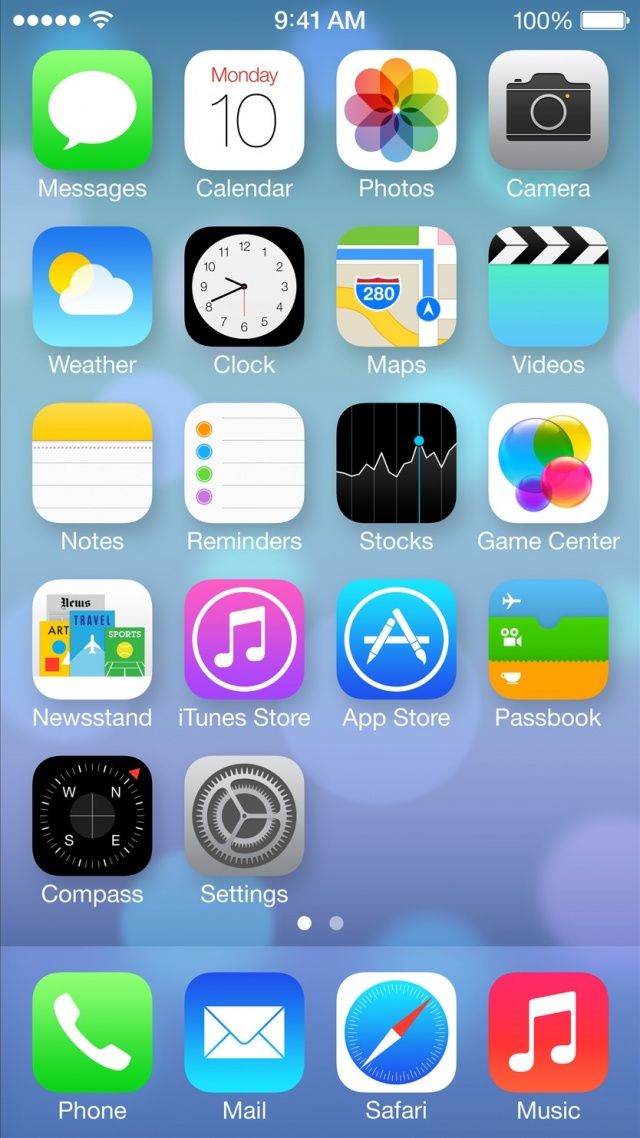
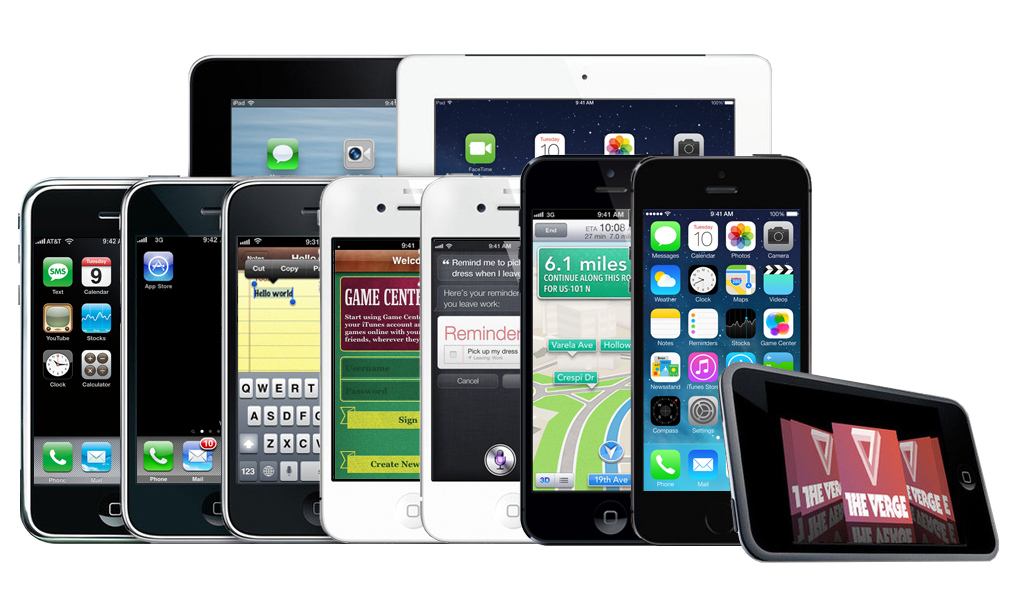
The only officially accepted way to add apps to an iOS terminal is to use Apple's App Store
iOS development is a vast topic
Developping for an embedded system
Conception based on user interface
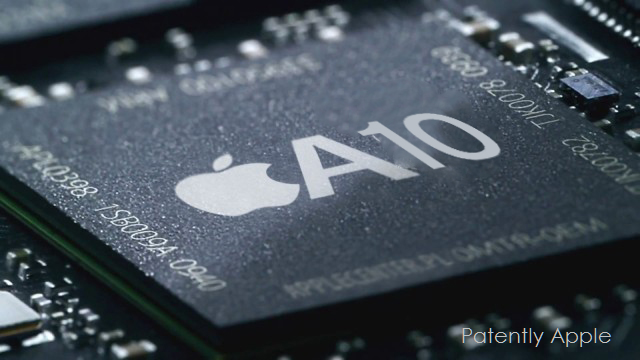
Processor
Storage
Other hardware

Developper
Programming language
Development environment
Development kit

Developper
Programming language
Development environment
Development kit
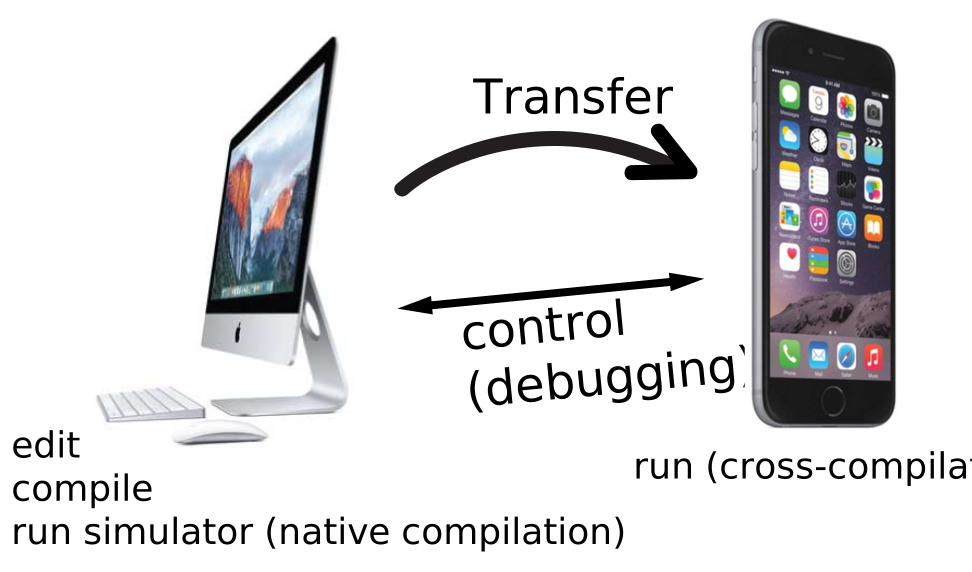
Limited resources
Handle urgent events
→ Writing the first app in XCode : Greeting
Mobile development is built around the user interface (screen):
Interruption
Examples :
Event
Examples :
Events are handled by "call-backs"
If an event is not enabled (or disabled), the OS will consider that there is nothing to be done.
The running program will not be notified of unhandled events occurring.
→ Programmatical version of Greeting
let a = 10
var b: Int = 12

b += a
let primes = [2, 3, 5, 7, 11, 13]

func isPrime(n: Int) -> Bool {
  for x in 2 ..< n {
    if n % x == 0 {
      return false
    }
  }
  return true
}
var x: Int
x = 12

if isPrime(x) {
  println("\(x) is prime.")
} else {
  println("\(x) is not prime.")
}let (immutable) or var (mutable)func, arguments and return values are typedvar a: Int? = 12
var b = 10
b += a // error, a could be nil
if a != nil {
b += a! // a is unwrapped
}
a = nil
b = nil // error
if let aValue = a {
// conditional unwrapping
b += aValue
}Swift introduces “optional” versions of all types
T? represents a value that can be either nil or a value of type Tnil valueIn a “classical” program
In object-oriented programming
class Person {
  var name: String // a property
  var age: Int

  init(name: String, age: Int) {
    self.name = name
    self.age = age
  }

  func greet() {  // a method
    print("Hello, \(name)!")
  }
  func increaseAge(years: Int) {
    age += years
  }

  func ageDifferenceWith(other: Person) -> Int {
    return age - other.age
  }
}class Student: Person {
var school: String?
var year: Int?
init(name: String, age: Int, school: String, year: Int){
self.school = school
self.year = year
super.init(name: name, age: age)
}
override init(name: String, age: Int) {
super.init(name: name, age: age)
}
override func greet() {
print("Hi, student \(name)")
}
func classDifferenceWith(other: Student) -> Int? {
if let year = year, oYear = other.year {
return year - oYear
}
return nil
}
}To create an object
These steps are performed by the init function
Objects are removed from memory automatically when nothing points to them (see later section)
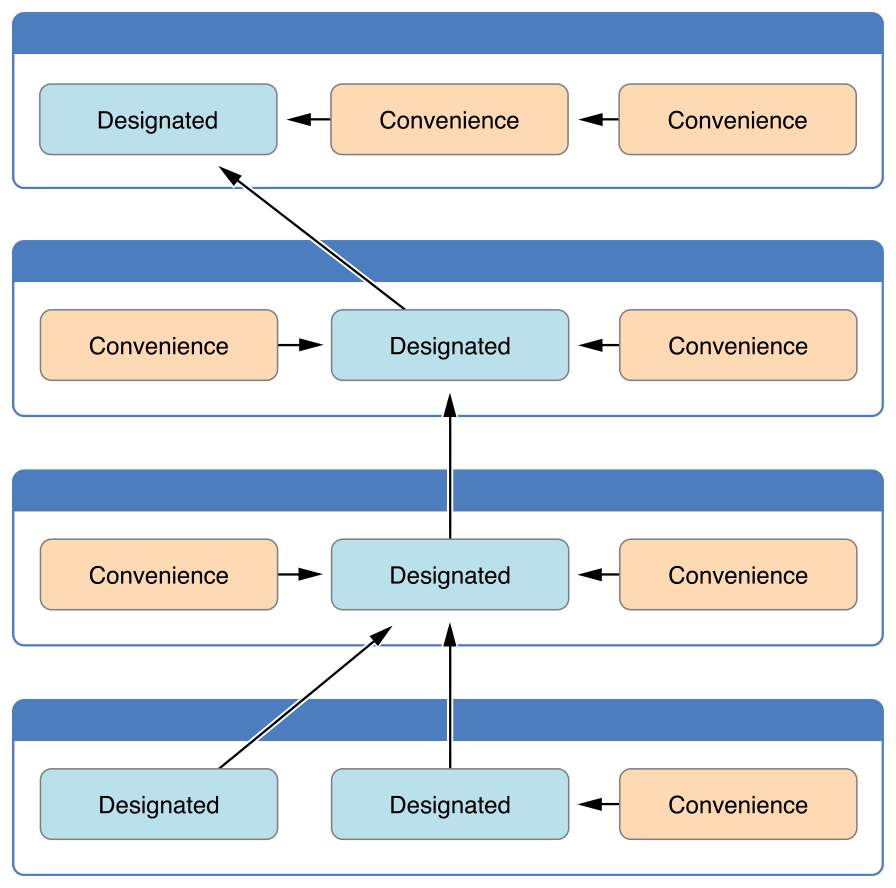
Classes can have more than one initializer
Back to the Greeting app.
class Player {

  var coinsInPurse: Int

  init(coins: Int) {
    coins = Bank.give(coins)
  }

  func winCoins(coins: Int) {
    coins += Bank.give(coins)
  }

  deinit {
    Bank.get(coins)
  }
}
When an object is removed from memory, its deinit function is called
This function should be used to clean up the objects or data owned by the removed object
deinit is called automatically, and should never be called manually
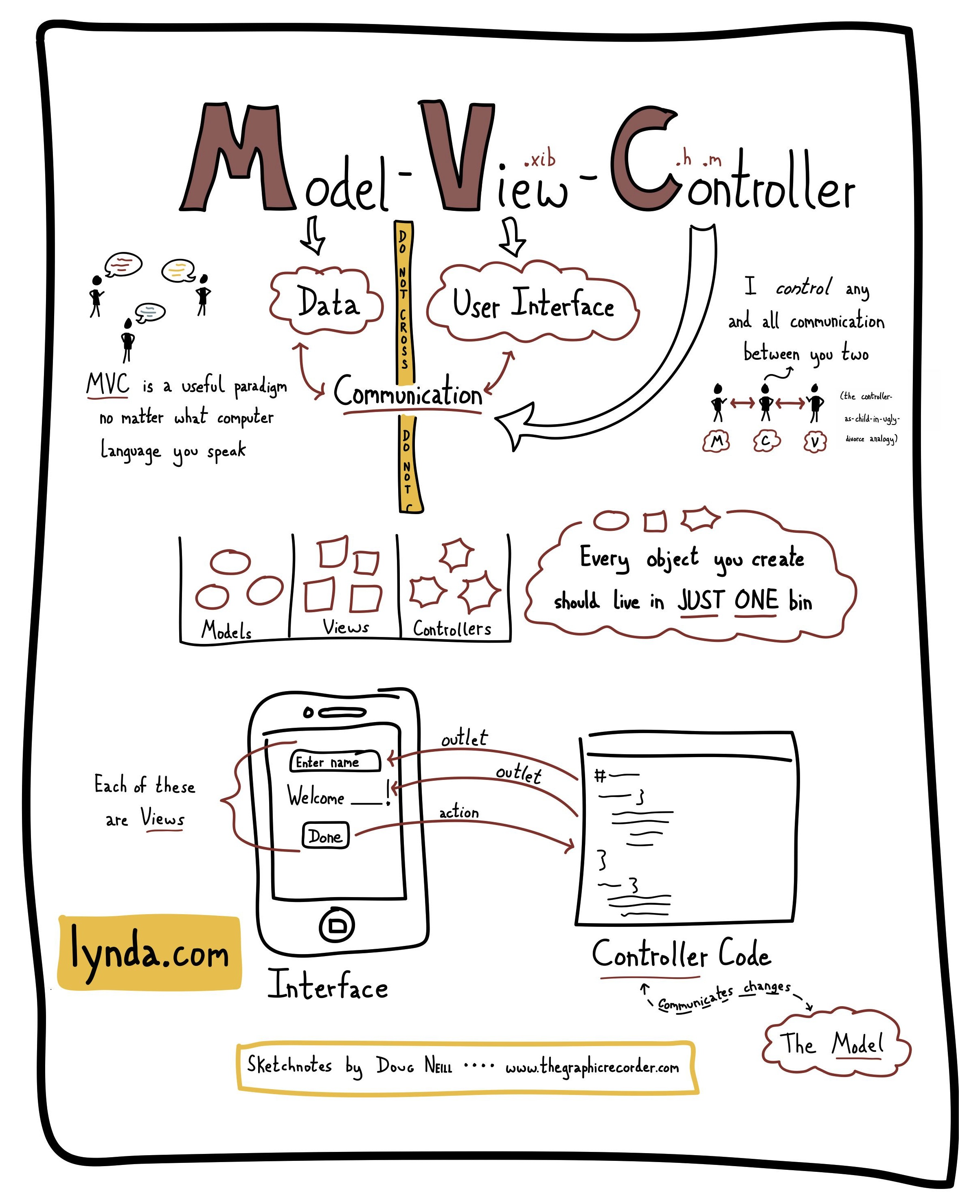
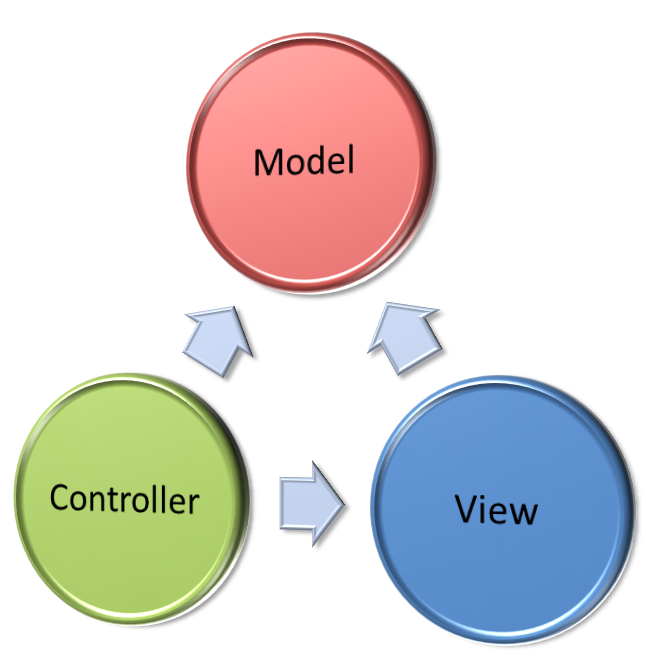
Design pattern, for structuring an application in 3 parts
class Player {
  var cards: [Card]
  var game: Game
  var points: Int
  var isTurnPlayer: Bool

  init(...) {
    ...
  }

  func playCard(card: Card) {
    ...
  }

  func endTurn() {
    ...
  }

  func draw(numberOfCards: Int) {
    ...
  }

  ...
}
In iOS, the model is represented by the data object classes
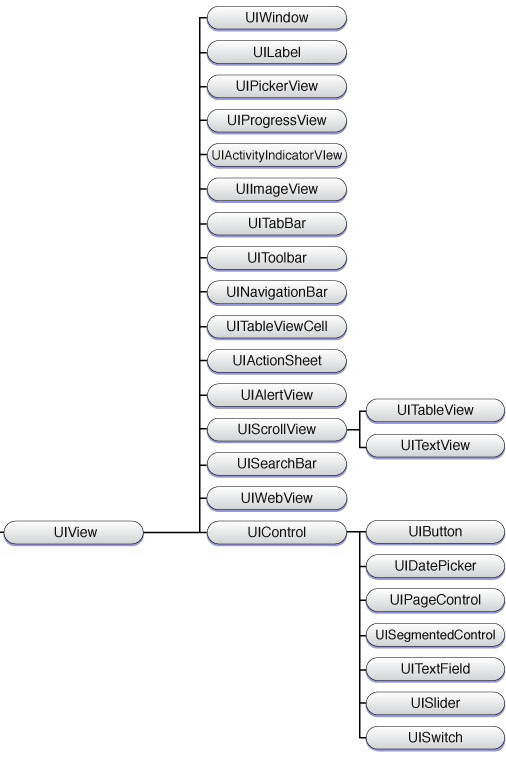
Cocoa Touch (iOS UI Framework) defines a class UIView
UIViewNote : the elements added to the Storyboard are subclasses of UIView
To create a user interface
What is a view ?
View hierarchy
let labelFrame = CGRect(x: 20, y: 50, width: 300, height: 50)
let label = UILabel(frame: labelFrame)
label.text = "Hello"
view.addSubview(label)

label.center = CGPoint(x: 170, y: 200)frame is a CGRect that defines the position and size of a view relative to its parentcenter is a CGPoint that positions the view without changing its sizebounds is a CGRect describing the frame of the view in its own coordinates. Usually origin is (0, 0)var superview: UIView?
var subviews: [UIView]
var window: UIWindow?
func addSubview(UIView)
func bringSubview(toFront: UIView)
func sendSubview(toBack: UIView)
func removeFromSuperview()
func insertSubview(UIView, at: Int)
func insertSubview(UIView, aboveSubview: UIView)
func insertSubview(UIView, belowSubview: UIView)
func exchangeSubview(at: Int, withSubviewAt: Int)
func isDescendant(of: UIView) -> BoolGameView
LogView
UITextView
StacksView
KingdomCardsView
StackView (x10)
UIImage (background)
UILabel (cost)
UILabel (remaining)
TreasureCardsView
StackView (x3)
UIImage (background)
UILabel (cost)
UILabel (remaining)
VictoryCardsView
StackView (x4)
UIImage (background)
UILabel (cost)
UILabel (remaining)
PlayerView
ChatView
UITextInput
UITextView
ButtonsView
UILabel (instruction)
UIButton (x3)
HandView
CardView (x3)
UIImage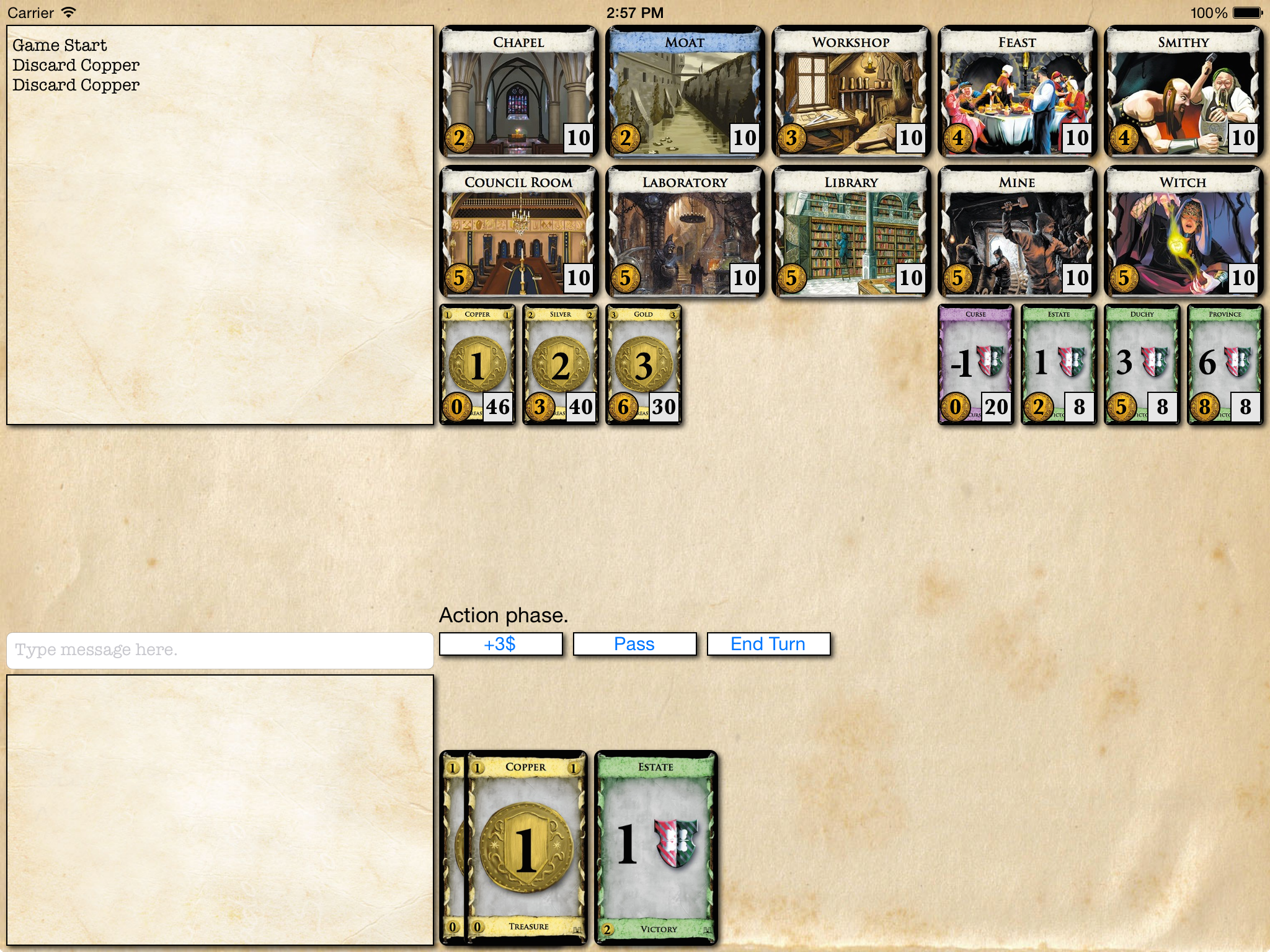
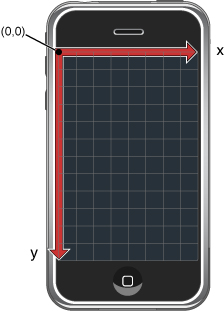
Cartesian coordinates system
Create a class that inherits from UIView
drawRectsetNeedsDisplaySee example : Multiplication
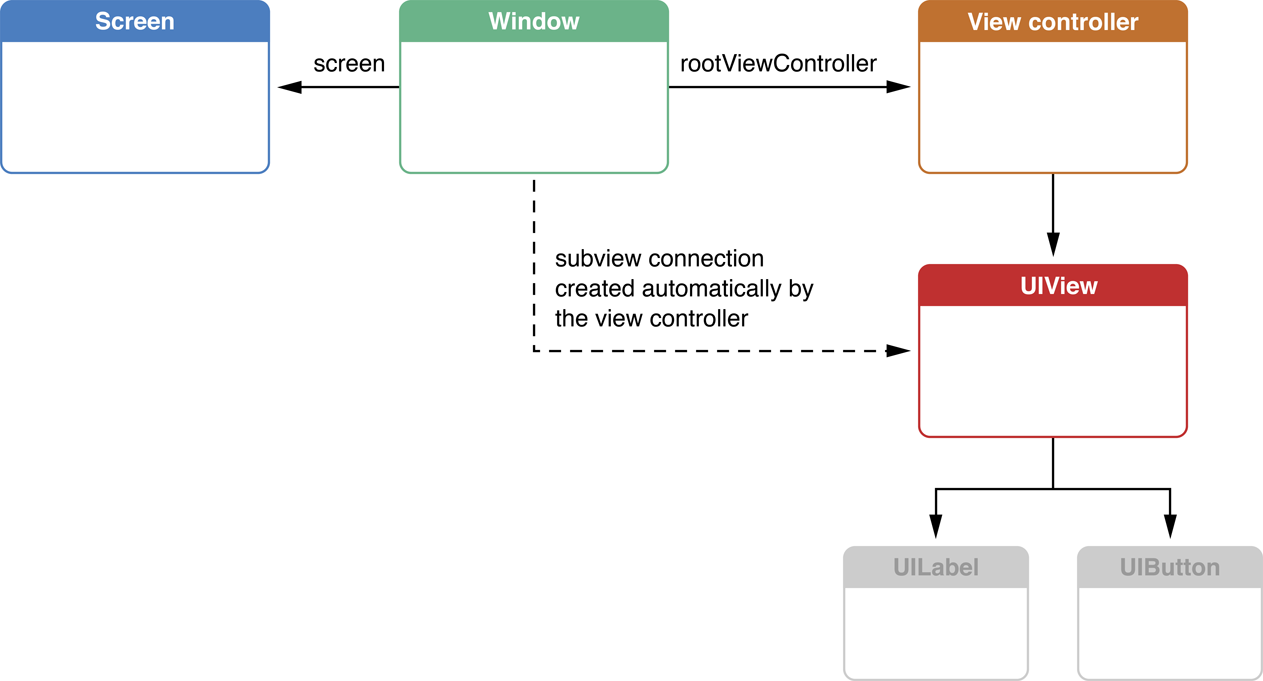
UIViewController implements view controllers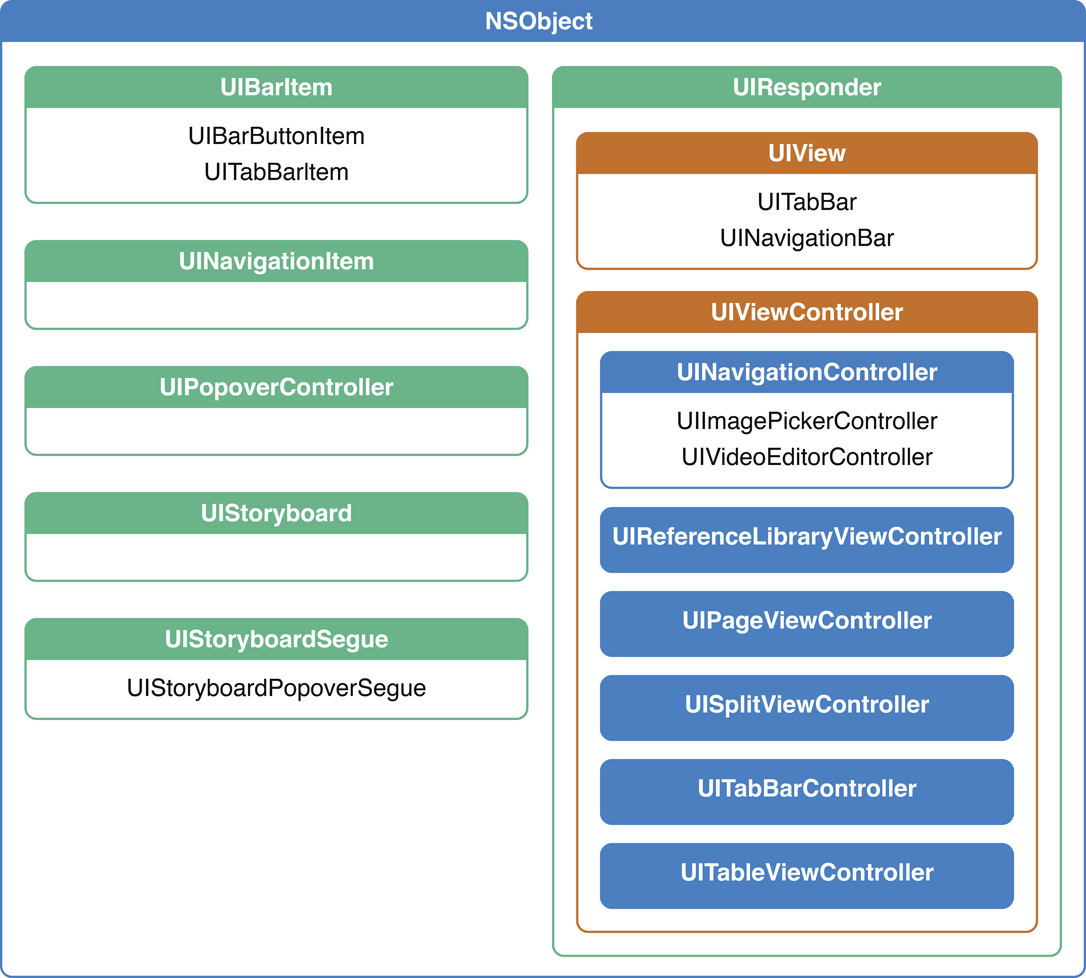
Important methods :
init : initialization of the view controllerloadView, viewDidLoad : creation of the viewviewWillAppear, viewDidAppear : the view is displayed on screenviewWillDisappear, viewDidDisappear : the view is removed from screen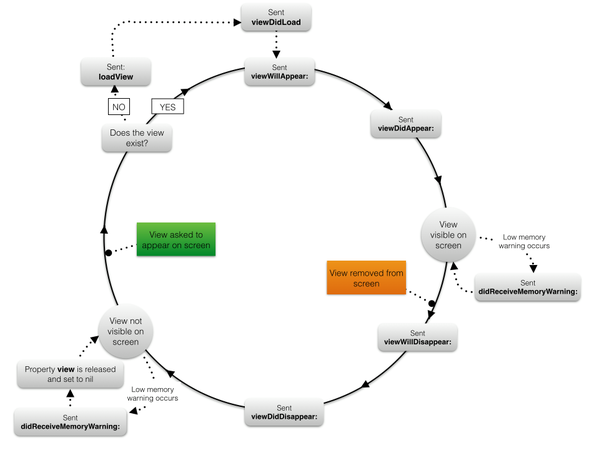
Content view controllers display content
examples : table view controller, most user-made view controllers
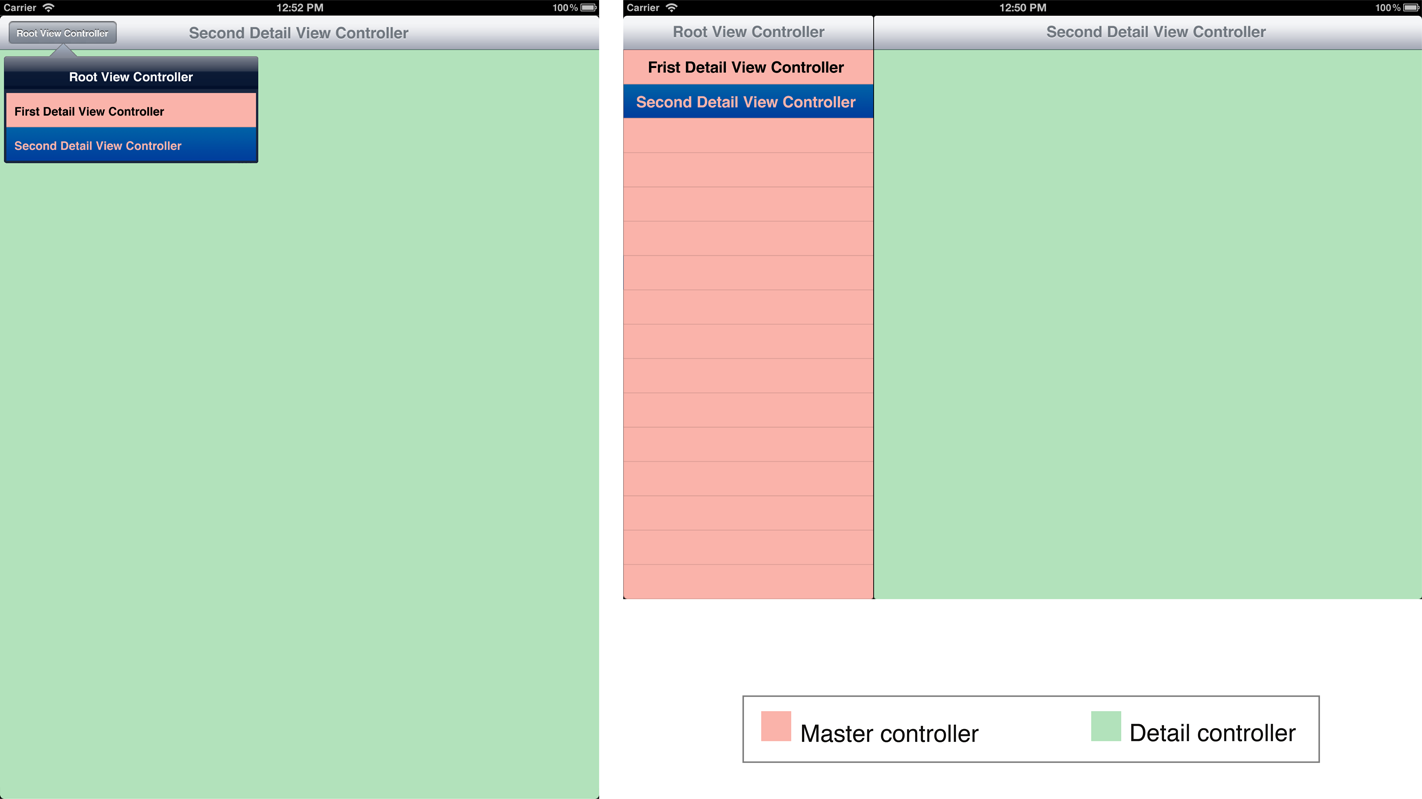
Container view controllers arrange content of other view controllers
examples : navigation controller, tab bar controller, split view controller
let subVC = SomeViewController()

addChildViewController(subVC)
subVC.didMoveToParentViewController(self)
view.addSubview(subVC.view)
Most of the time one content view controller is sufficient
It is possible to nest content view controllers when necessary
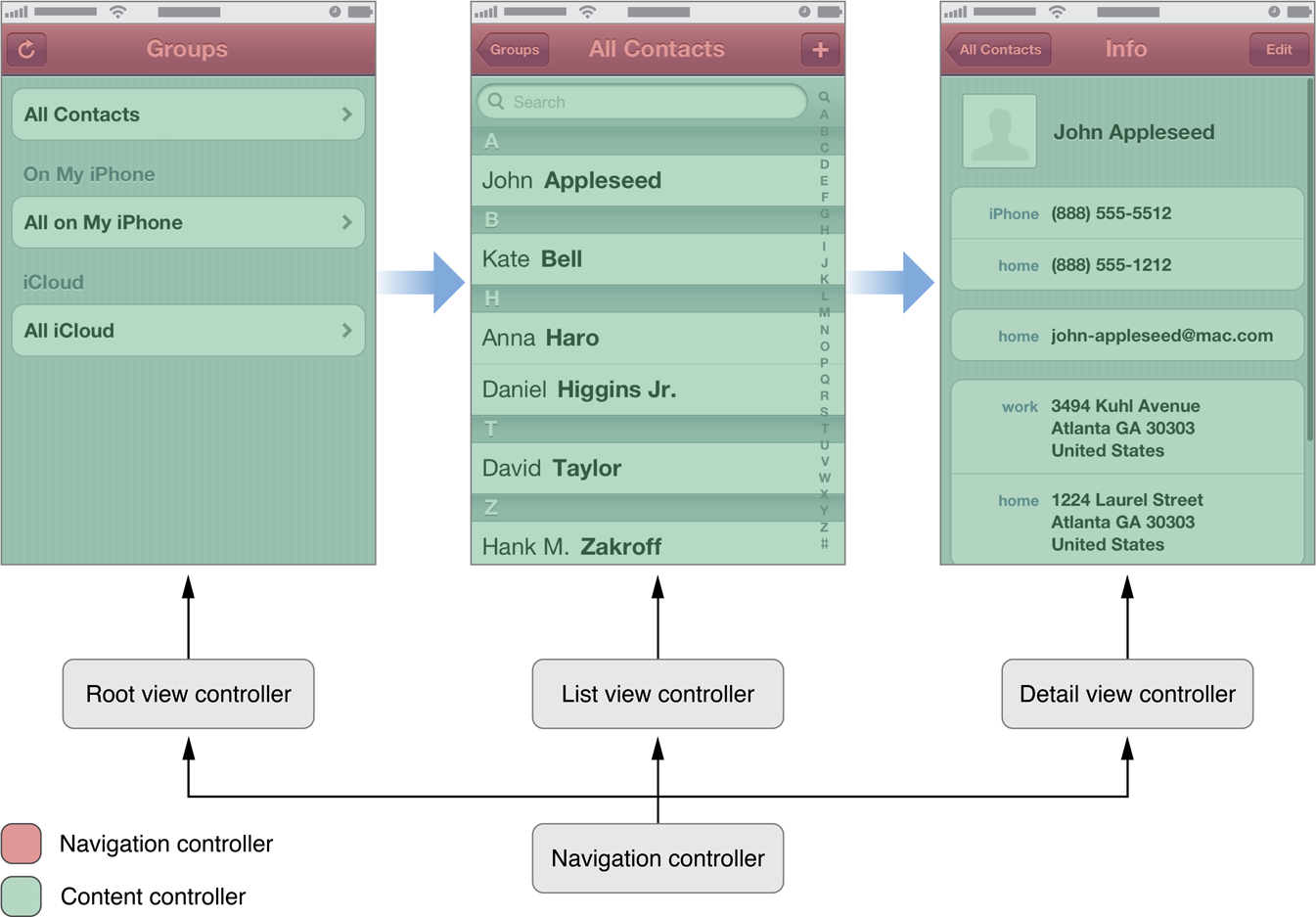
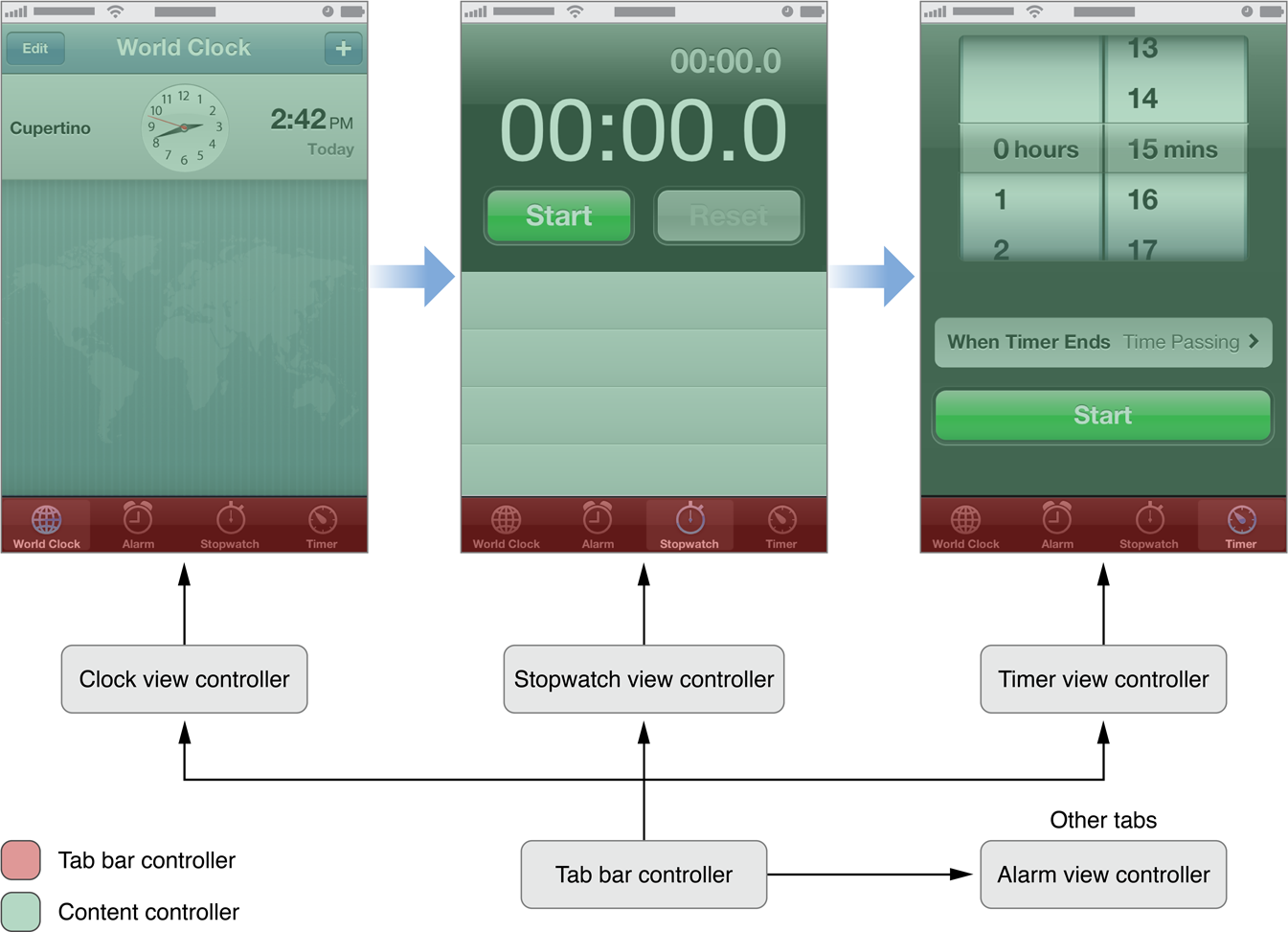
var view: UIView!
var isViewLoaded: Bool

func loadView()
func viewDidLoad()

func viewWillAppear(Bool)
func viewDidAppear(Bool)
func viewWillDisappear(Bool)
func viewDidDisappear(Bool)
func viewWillLayoutSubviews()
func viewDidLayoutSubviews()
func updateViewConstraints()
...UIViewControllerThe UIViewController class defines two possible initializers
init(nibName nibName: String?, bundle nibBundle: NSBundle?) is used when creating a new view controller programmaticallyinit(coder aDecoder: NSCoder) is used when the view controller is automatically created by iOS (from a storyboard for instance)Warning : The view is not loaded at the initialization of the controller
viewDidLoad and viewDidAppear let viewController = UIViewController(nibName: nil, bundle: nil)class MyViewController: UIViewController {
init() {
super.init(nibName: nil, bundle: nil)
}
}Nib file (view is created with Nib contents) :
class MyViewController: UIViewController {
  init() {
  super.init(nibName: "nameOfNibFile", bundle: nil)
  }
}A simple example : Quiz
Slightly more complex example : Tabs (UITabBarController)
let vc = MyViewController()
UIApplication.sharedApplication().keyWindow!.
  rootViewController = vc
let vc = MyViewController()
presentViewController(vc, animated: true, completion: nil)
dismissViewControllerAnimated(true, completion: nil)Example : SwitchController
// create a navigation controller and its
// root controller
let vc = ViewController()
let nc = UINavigationController(rootViewController: vc)
window.rootViewController = nc
// create a new controller an push it on top
let vc2 = ViewController()
navigationController?.pushViewController(vc2, animated: true)
// pop the top controller (thus recovering
// the previous one)
navigationController?.
  popViewControllerAnimated(true)
Example : Navigation Controller
There are many ways to switch from a view controller to another one (and change the displayed view)
Controller transitions can be defined in the Interface Builder (storyboards)
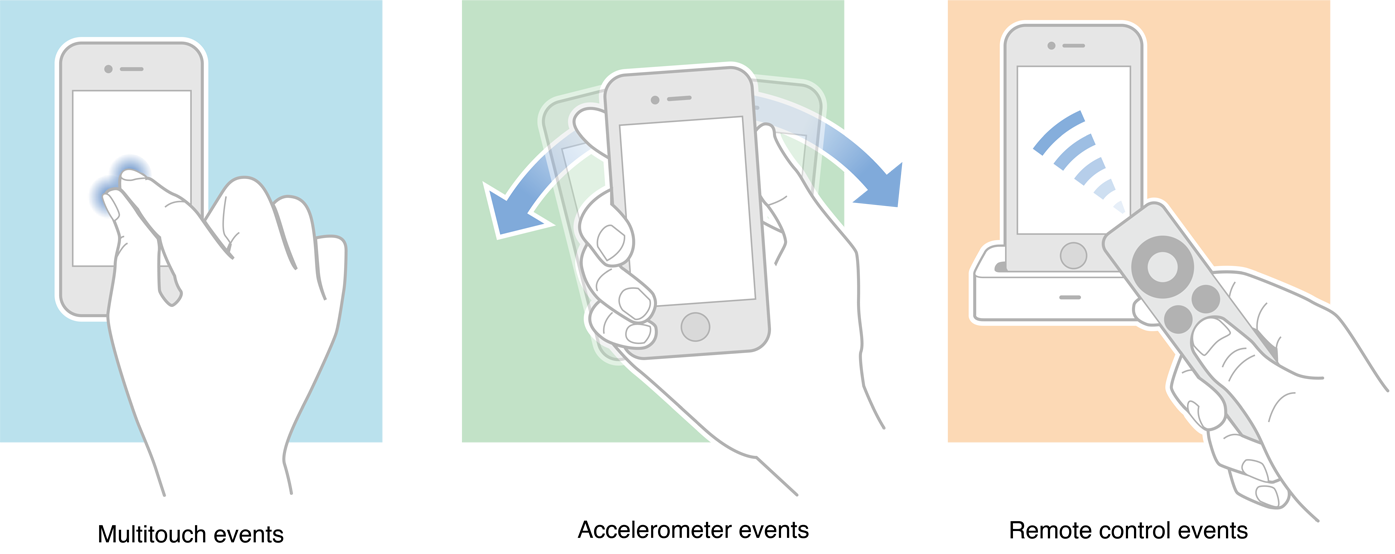
There are 4 kinds of basic events to interact with the UI :
The class of objects that are prepared to handle such events is UIResponder
UIApplication, UIWindow, UIView and UIViewController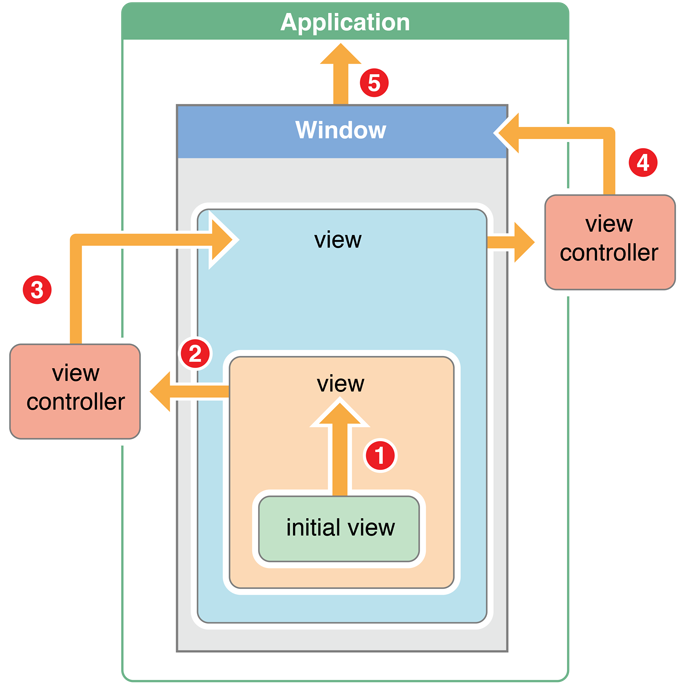
When an event is detected it is sent to a specific responder
The event goes through the responder chain until a responder handles it
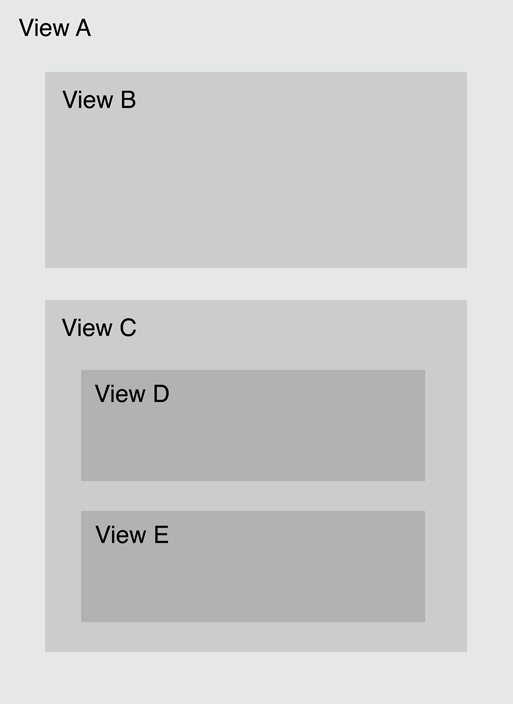
Returns where a touch occurred
hitTest:withEvent:Only the point where the touch started counts
var timestamp: NSTimeInterval
var type: UIEventType
var subtype: UIEventSubtype
func allTouches() -> Set?
func touchesForView(_ view: UIView) -> Set?
func touchesForWindow(_ window: UIWindow) -> Set?
UIEvent is the class of objects created when an event occurs
UITouch objectsenum UIEventSubtype : Int {
case None
case MotionShake
case RemoteControlPlay
case RemoteControlPause
case RemoteControlStop
case RemoteControlTogglePlayPause
case RemoteControlNextTrack
case RemoteControlPreviousTrack
case RemoteControlBeginSeekingBackward
case RemoteControlEndSeekingBackward
case RemoteControlBeginSeekingForward
case RemoteControlEndSeekingForward
}UIKit detects 3 events associated with a shake
motionBegan(_:with:) when a shake motion beginsmotionEnded(_: ith:) when a shake motion endsmotionCancelled(_:with:) when a shake motion is cancelled by another event (app becomes inactive, view disappears, etc.)motionBeganThe motion for a shake is UIEventSubtypeMotionShake
There are 4 methods to handle touch events
touchesBegan(_:with:)touchesMoved(_:with:)touchesEnded(_:with:)touchesCancelled(_:with:)The first parameter of each method contains the set of UITouch objects that are relevant to the method (began, moved, ended or cancelled)
Touch events in Bezier
Some specific gestures can be recognized automatically :
The class UIGestureRecognizer (and its subclasses) handle such events
let tapRecognizer = UITapGestureRecognizer()
tapRecognizer.numberOfTapsRequired = 2
tapRecognizer.addTarget(self, action: "handleTap:")
tapRecognizer.delegate = self
view.addGestureRecognizer(tapRecognizer)
Warning : the view must have enabled the user interaction
view.userInteractionEnabled = trueTo recognize a gesture :
Double tap recognizer in Bezier
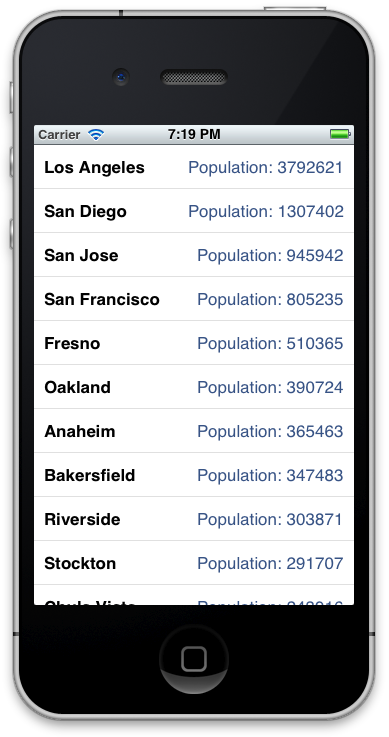
A table view is the standard way to display a list of elements :
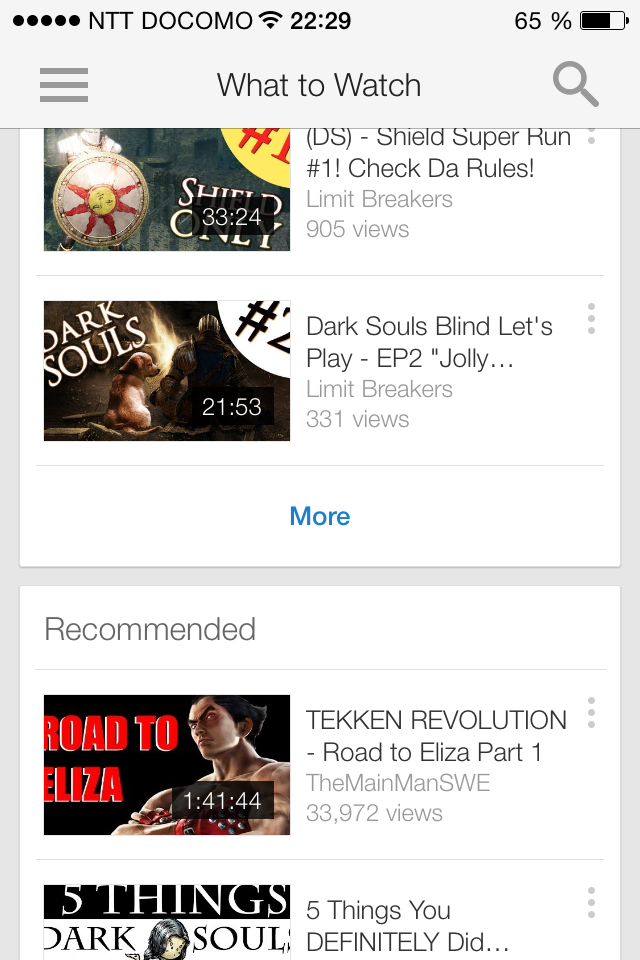
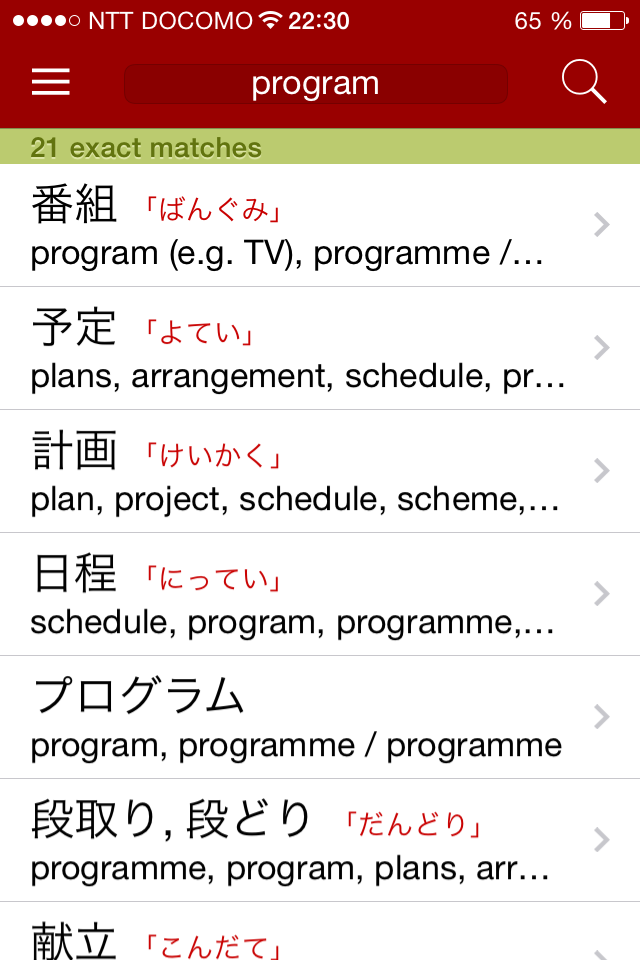
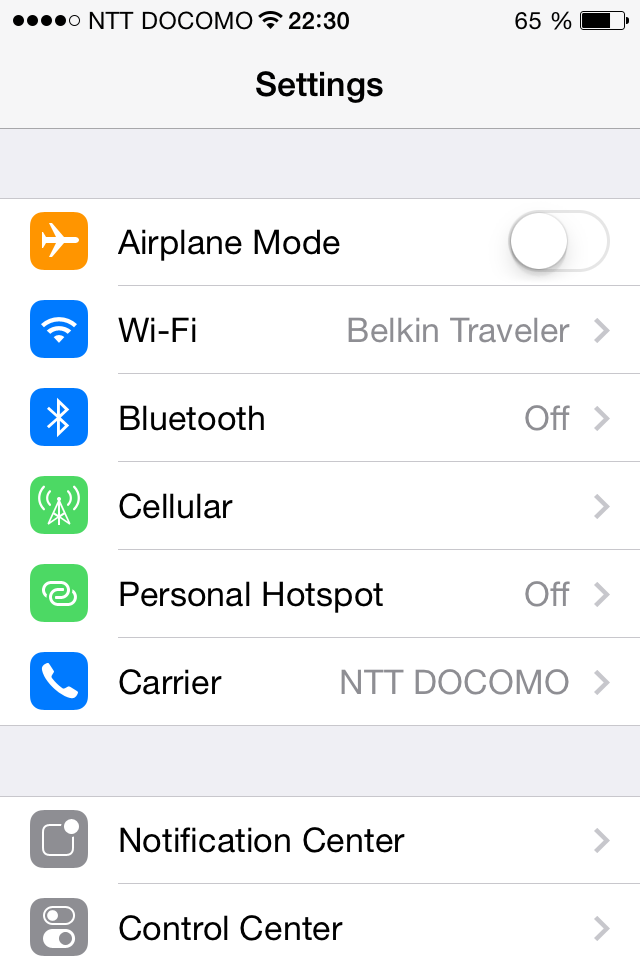
Representation of data
Used by almost all apps
All of these elements are fully customizable views
Table views are a prime example of MVC
UIViewControllerThe view controller implements functions to act as
UITableViewDataSourceUITableViewDelegate// methods in UITableViewDataSource
tableView(_:cellForRowAt:) (*)
numberOfSections(in:)
tableView(_:numberOfRowsInSection:) (*)
sectionIndexTitles(for:)
tableView(_:sectionForSectionIndexTitle:at:)
tableView(_:titleForHeaderInSection:)
tableView(_:titleForFooterInSection:)
(*) required methodsThe data source must be able to answer questions such as :
tableView(_:cellForRowAt:)UITableViewCellNSIndexPath, that locates a cell by its section and rowProblem :
Solution :
Tight memory management
Access to cells should always use this system
func tableView(_: UITableView, cellForRowAtIndexPath indexPath: NSIndexPath) -> UITableViewCell {
  let cell = tableView.dequeueReusableCellWithIdentifier("normalCell", forIndexPath: indexPath)
  cell.textLabel?.text = "new label"
  return cell
}tableView(_:commit:forRowAt:)
tableView(_:canEditRowAt:)
tableView(_:canMoveRowAt:)
tableView(_:moveRowAt:to:)The user interacts with the table view
User interaction calls functions from the UITableViewDataSource protocol
Controller must make changes to data
The table view delegate helps manage other features of the table view
Example : TableViews
Swift uses Automatic Reference Counting (ARC) to manage objects in memory
Most of the time, ARC works fine automatically
class Person {
  var apartment: Apartment?
  ...
}
class Apartment {
  var tenant: Person?
  ...
}

var john = Person()
var apt = Apartment()
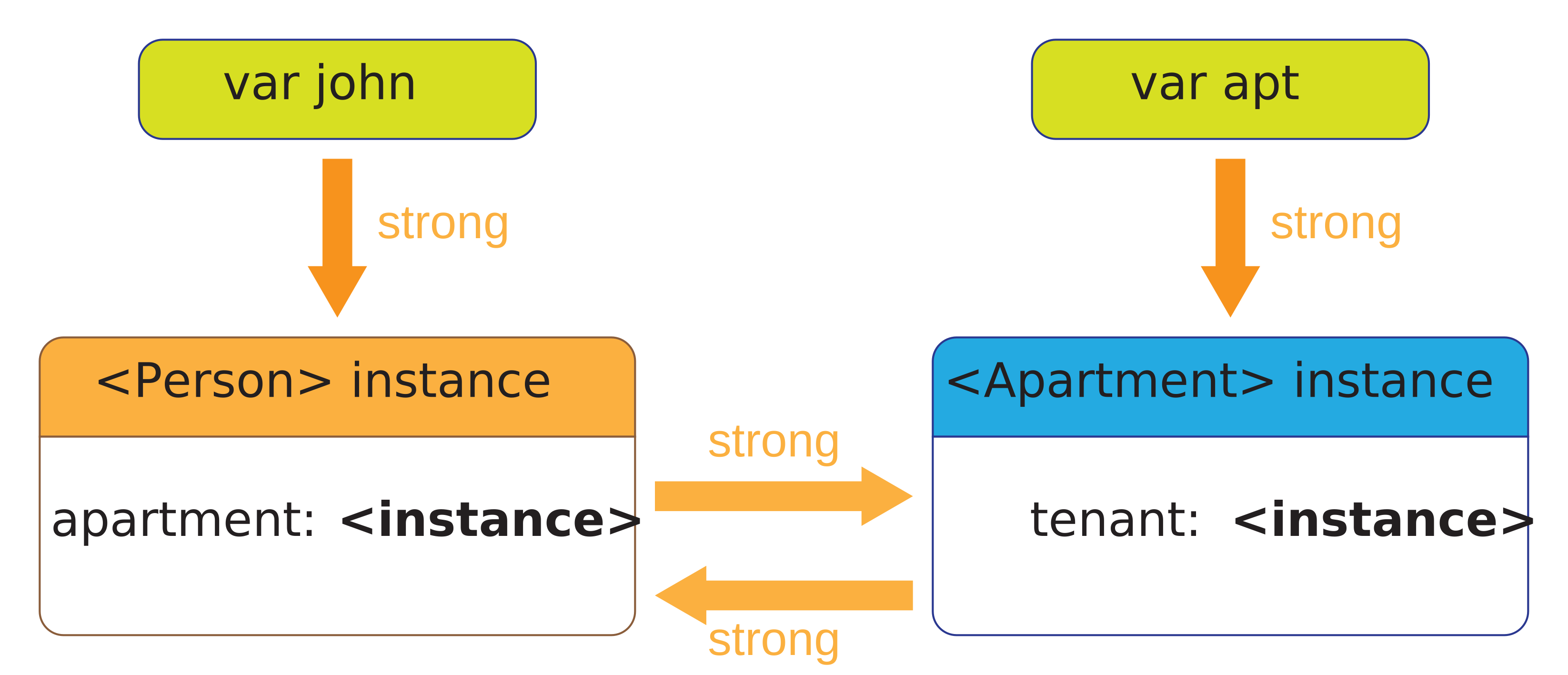
john.apartment = apt
apt.tenant = john
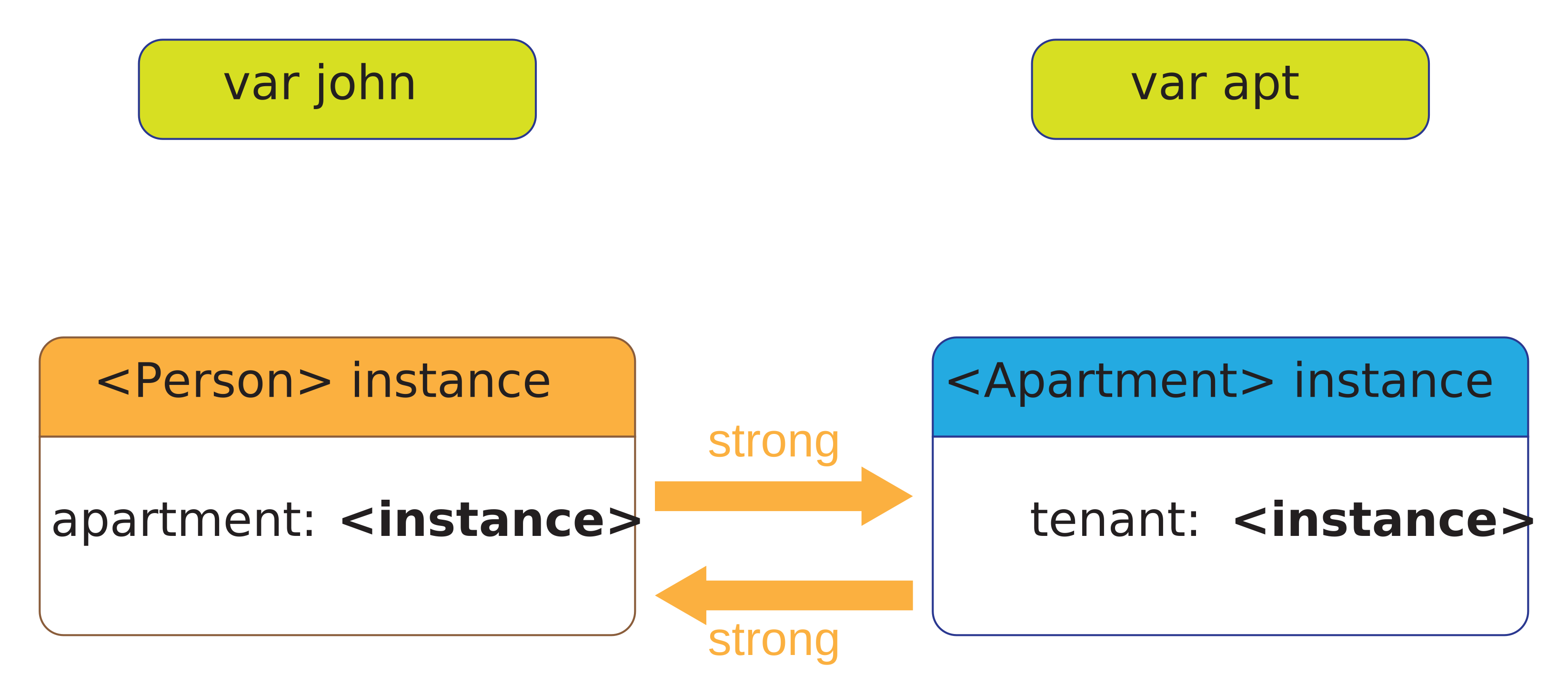
john = nil
apt = nil
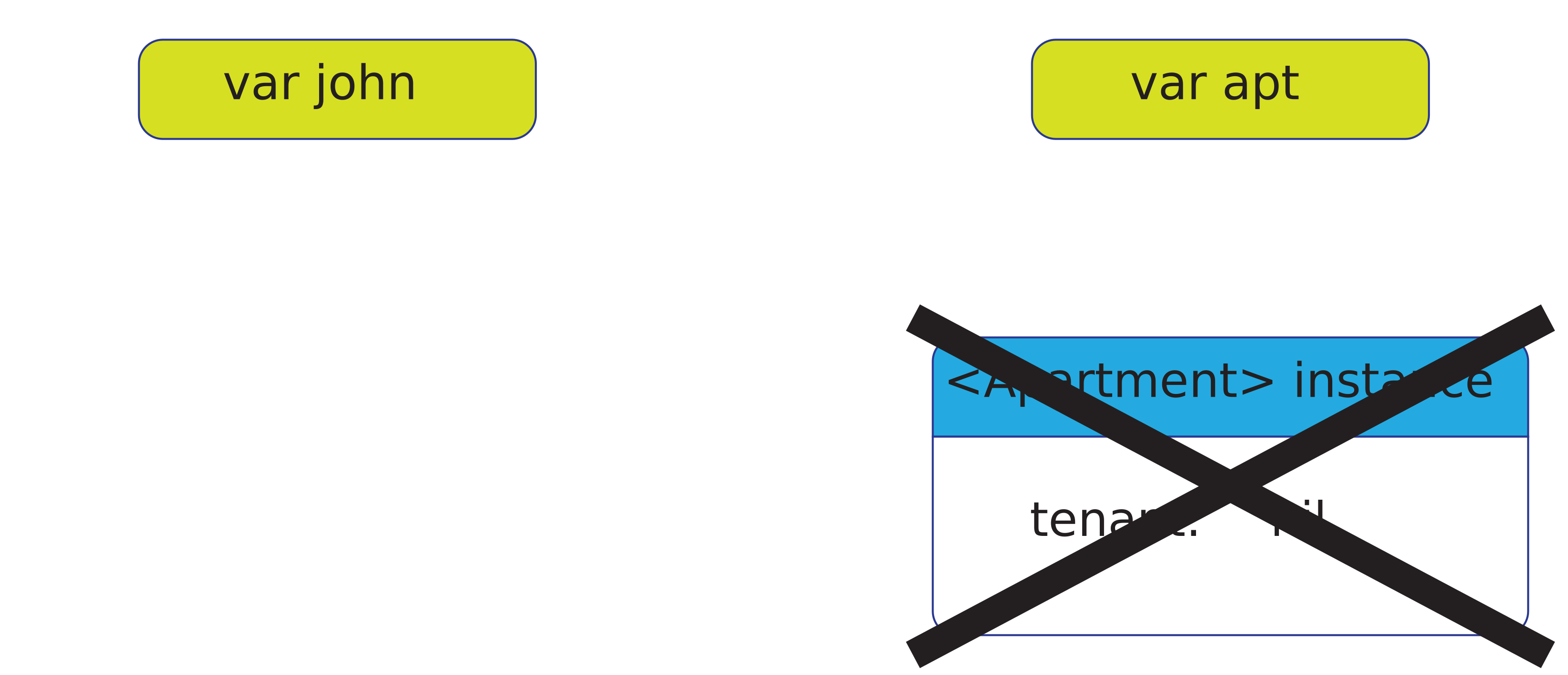
// neither object is deinitialized
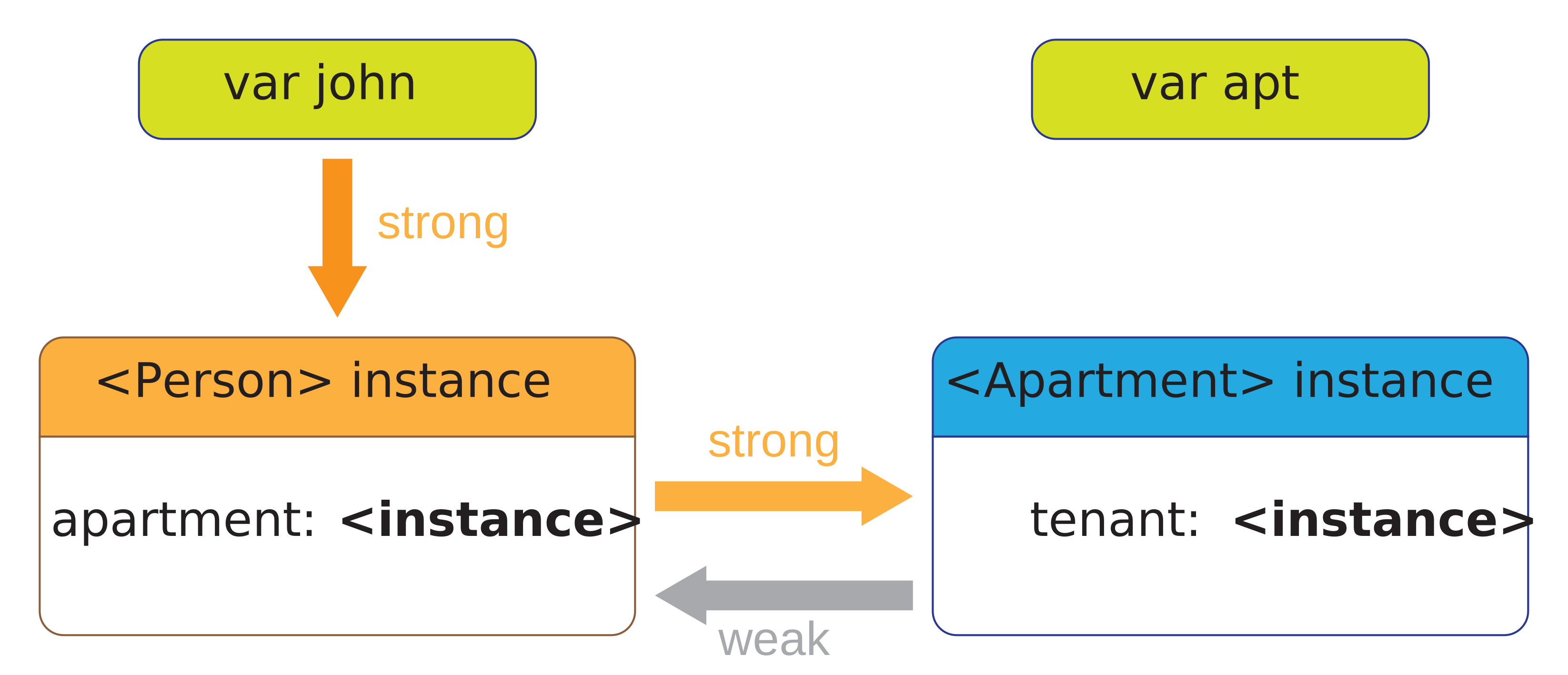
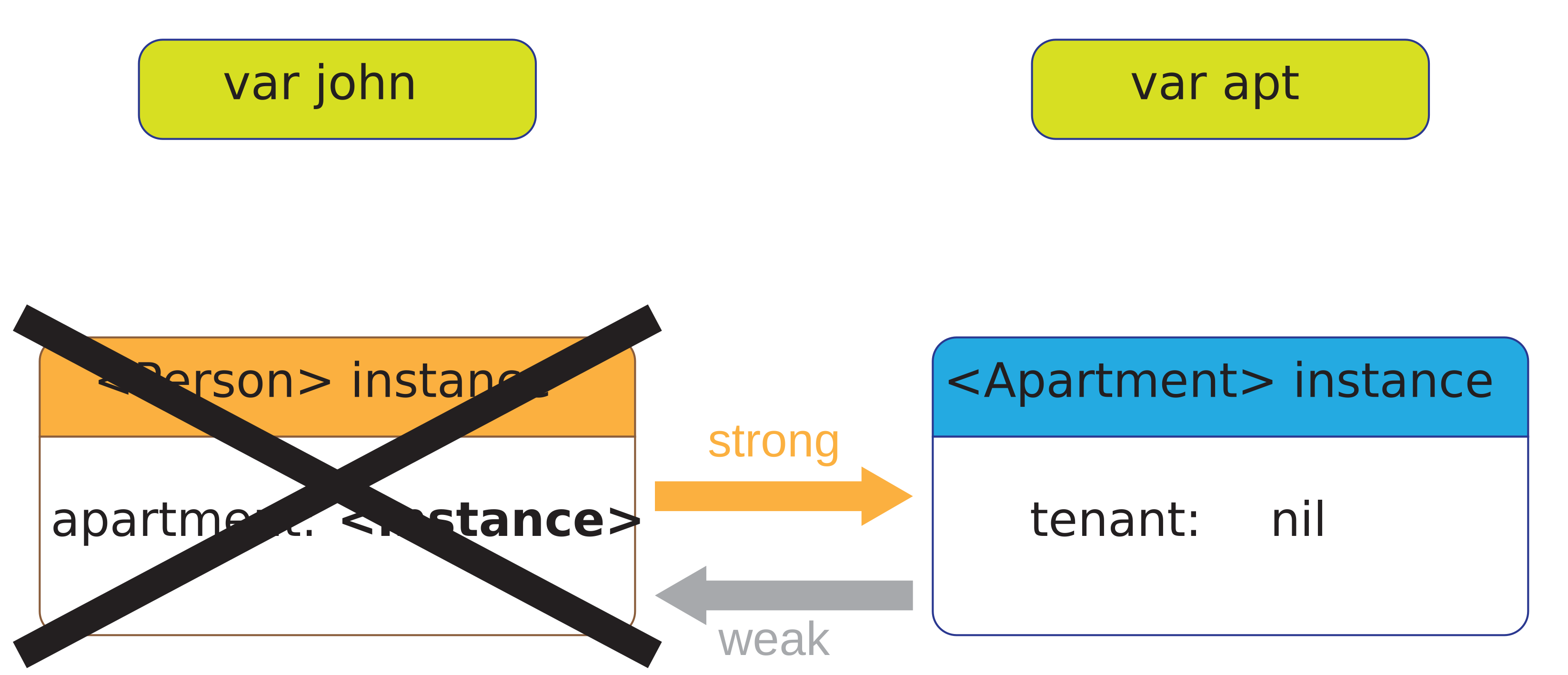
Problem : sometimes two (or more) objects refer to each other and are not removed from memory
john = Person(...)
apt = Apartment(...)
john = Person(...)
apt = Apartment(...)
john.apartment = apt
apt.tenant = john
john = Person(...)
apt = Apartment(...)
john.apartment = apt
apt.tenant = john
john = nil
apt = nil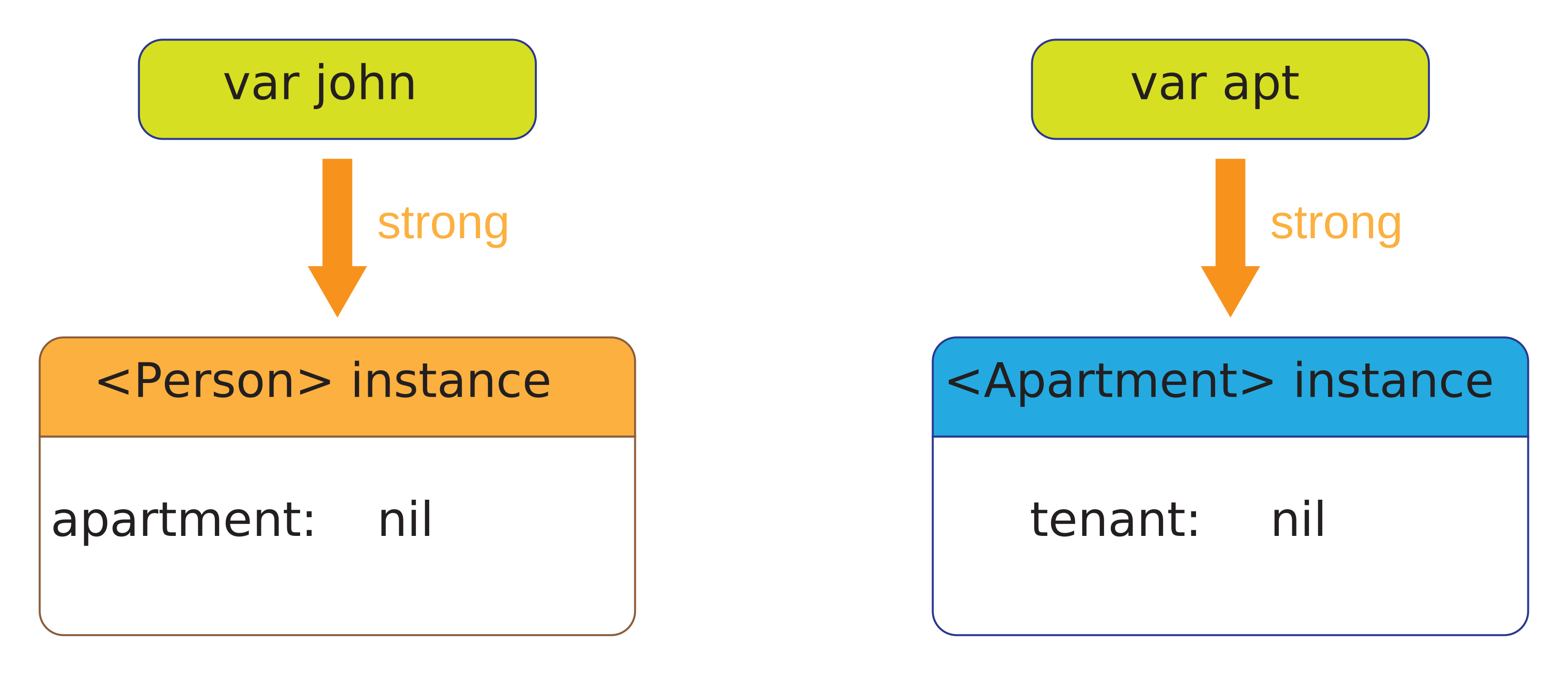
class A {
  var x: Int          // strong
  weak var y: Int?    // weak
  unowned var z: Int  // unowned
  ...
}
To break reference cycles, we use weak or unowned references
niljohn = Person(...) class Apartment {
apt = Apartment(...) weak var tenant: Person?
john.apartment = apt ...
apt.tenant = john }
john = Person(...)                  class Apartment {
apt = Apartment(...)                  weak var tenant: Person?
john.apartment = apt                  ...
apt.tenant = john                   }
apt = nil
john = Person(...)                  class Apartment {
apt = Apartment(...)                  weak var tenant: Person?
john.apartment = apt                  ...
apt.tenant = john                   }
apt = nil
john = nil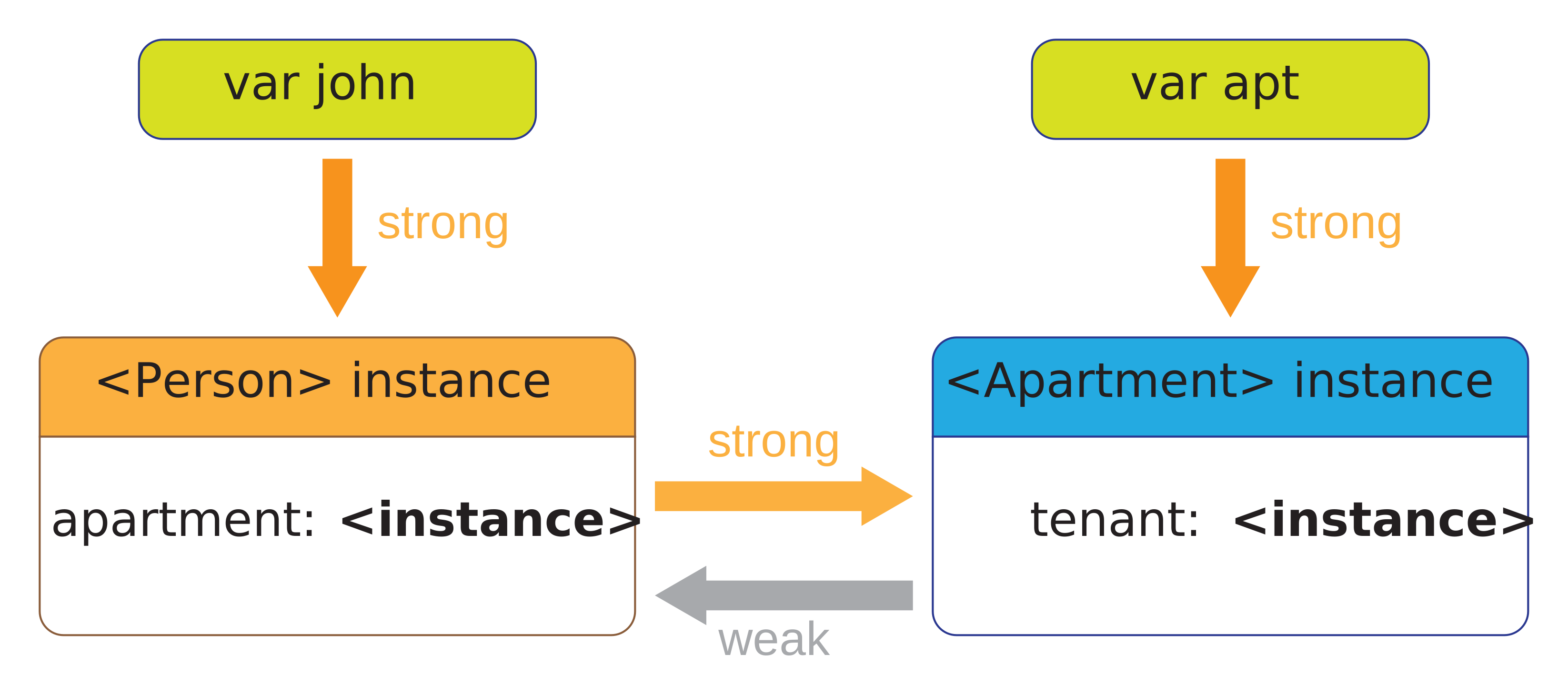
Automatic Reference Counting in a Playground
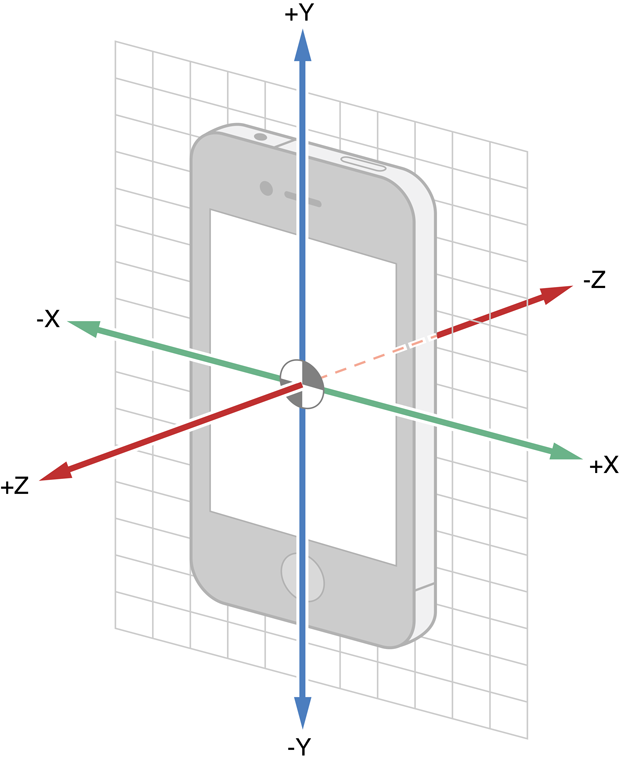
The iDevices contain motion detectors that can measure
CoreMotion framework
Main class is CMMotionManager
To react to motion
CMMotionManager objectCoreMotion is independent from UIKit
data can be
Cannot be tested on simulator

iOS devices can track geographic location
MapKit for displaying geographic informationCoreLocation framework
use CLLocationManager class
Similar to motion events
CLLocationManagerSee CLLocationManagerDelegate protocol for possible interaction with the manager
Using location services requires user authorization
Idea : broadcast information between elements across your app
Part of the Foundation framework
Use NotificationCenter class and related elements
Default notification center : NotificationCenter.default
Many notifications already defined by API
Notification has
Notification.Name)AnyObject)// declare a new notification name
extension Notification.Name {
static let specialEvent = Notification.Name("Special Event")
}
// post a new notification
NotificationCenter.default.post(
name: .specialEvent,
object: self,
userInfo: nil)
// register to a given notification
NotificationCenter.default.addObserver(
self,
selector: #selector(specialAction(notification:)),
name: .specialEvent,
object: nil)
// setup a handler
func specialAction(notification: NSNotification) {
println("A special event occurred!")
}Sometimes, some tasks should be executed asynchronously (in parallel)
Tasks are organized in queues
Part of the Foundation framework
The whole set of functions is denoted as Grand Central Dispatch (GCD)
To dispatch an asynchronous task
async on the queue with code to be executedQueues can be
Some queues are already defined
userInteractiveuserInitiateddefaultutilitybackgroundunspecified// create a queue
let queue = DispatchQueue(label: "uniqueID")
let queue = DispatchQueue(label: "uniqueID", qos: .userInitiated)
// use existing
let bgQueue = DispatchQueue.global(qos: .global)
let mainQueue = DispatchQueue.main
// dispatch to queue
queue.async {
// some code
}
// background task with UI action
bgQueue.async {
// do some complicated task in the background
DispatchQueue.main.async {
// do a simple task on the UI when the previous task
// finishes
}
}There are many options available to store persistent data on an iDevice
UserDefaults : simplest solution, stores simple informationNSCoding : intermediate solution, stores complex objects to fileCoreData : most complete solution, stores objects to a databaseTo read or write values :
UserDefaults.standardAssociate values to keys (Strings)
Usually used for storing default values or user preferences
Can store
DataStringNumberDateArrayDictionaryVery simple to use, but limited
// get a reference to the UserDefaults
let defaults = UserDefaults.standard

// set the value for key "userNameKey"
defaults.set("Guybrush Threepwood", forKey: "userNameKey")

// get the value for key "userNameKey"
let name = defaults.string(forKey: "userNameKey")
println(name!)| CoreData | NSCoding | |
|---|---|---|
| Entity Modeling | Yes | No |
| Querying | Yes | No |
| Speed | Fast | Slow |
| Serialization Format | SQLite, XML, or NSData | NSData |
| Migrations | Automatic | Manual |
| Undo Manager | Automatic | Manual |
| CoreData | NSCoding | |
|---|---|---|
| Persists State | Yes | Yes |
| Pain in the Ass | Yes | No |
The NSCoding protocol requires two methods
encode(with coder: NSCoder) describes how to convert the object into an NSData object (byte sequence)init(coder decoder: NSCoder) describes how to create the object from an NSData objectClasses NSKeyedArchiver and NSKeyedUnarchiver perform the conversions
NSCoding// define a class and describe how to archive/unarchive it
class Person: NSObject, NSCoding {
let name: String
let age: Int
init(name: String, age: Int) {
self.name = name
self.age = age
}
required init?(coder decoder: NSCoder) {
self.name = decoder.decodeObject(forKey: "name") as! String
self.age = decoder.decodeInteger(forKey: "age")
}
func encode(with coder: NSCoder) {
coder.encode(name, forKey: "name")
coder.encode(age, forKey: "age")
}
}var people = [Person]()
people.append(Person(name: "Sherlock Holmes", age: 25))
people.append(Person(name: "Mycroft Holmes", age: 32))
// encode objects and save data
let encodedData = NSKeyedArchiver.archivedData(withRootObject: people)
UserDefaults.standard.set(encodedData, forKey: "people")
// retrieve data and decode into objects
let data = UserDefaults.standard.data(forKey: "people")!
let myPeopleList = NSKeyedUnarchiver.unarchiveObject(with: data) as! [Person]Saving the cards list in the TableViews app.
There are two main options for managing and animating 2D objects
You could also redo everything by hand on UIView by redefining drawRect...
Possible options for 3D graphics and animations :